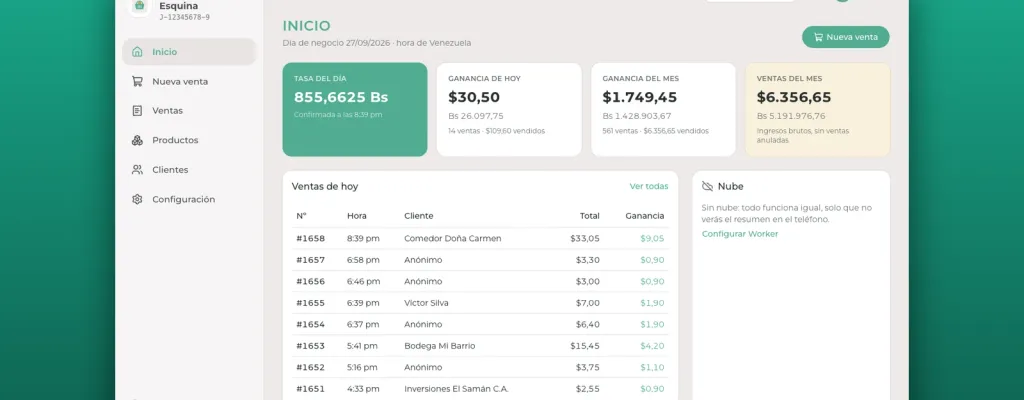
Bllt (pronounced like "billete", Spanish for "banknote") is a free, open source desktop app for small businesses in Venezuela, such as corner stores, grocery shops and neighborhood businesses. It tracks inventory, sales and customers in US dollars, and stores the BCV (Central Bank of Venezuela) exchange rate used for each sale. Everything lives on the business's PC and works without internet. The cloud is optional and lets several computers share the same data and shows the day's summary on a phone.
It was born to solve a friend's need right before he opened his business. The story, with the decisions I made and what I would do differently, is in how Bllt was born. Here I focus on what it does, how it is built and why it can be useful for other businesses.
The problem it solves
In Venezuela many businesses set their prices in dollars and charge in bolívares at the official rate of the day. That complicates something that should be simple, like knowing how much you earned. If the rate changes every day, a spreadsheet with prices in bolívares stops reflecting reality very quickly, and recalculating history with today's rate produces numbers that never happened.
Then there is connectivity. Power outages and internet drops are part of daily life, and a business cannot stop selling because a cloud service is not responding.
The available options tend to go to one of two extremes. On one side there are full back-office systems with fiscal invoicing, printers and modules a small business does not need, and on the other a notebook and a calculator. Bllt sits in the middle, with just enough to control inventory and sales, without complicated setup.
What it does
The rate of the day, confirmed by a person
The first time Bllt opens each day, it asks to confirm the rate. The app suggests the BCV rate from a public API (DolarApi (opens in a new tab)), but the rate in use is the one a user confirms, and it can always be typed by hand. Without a confirmed rate no sales can be recorded, so every sale is tied to a real rate.
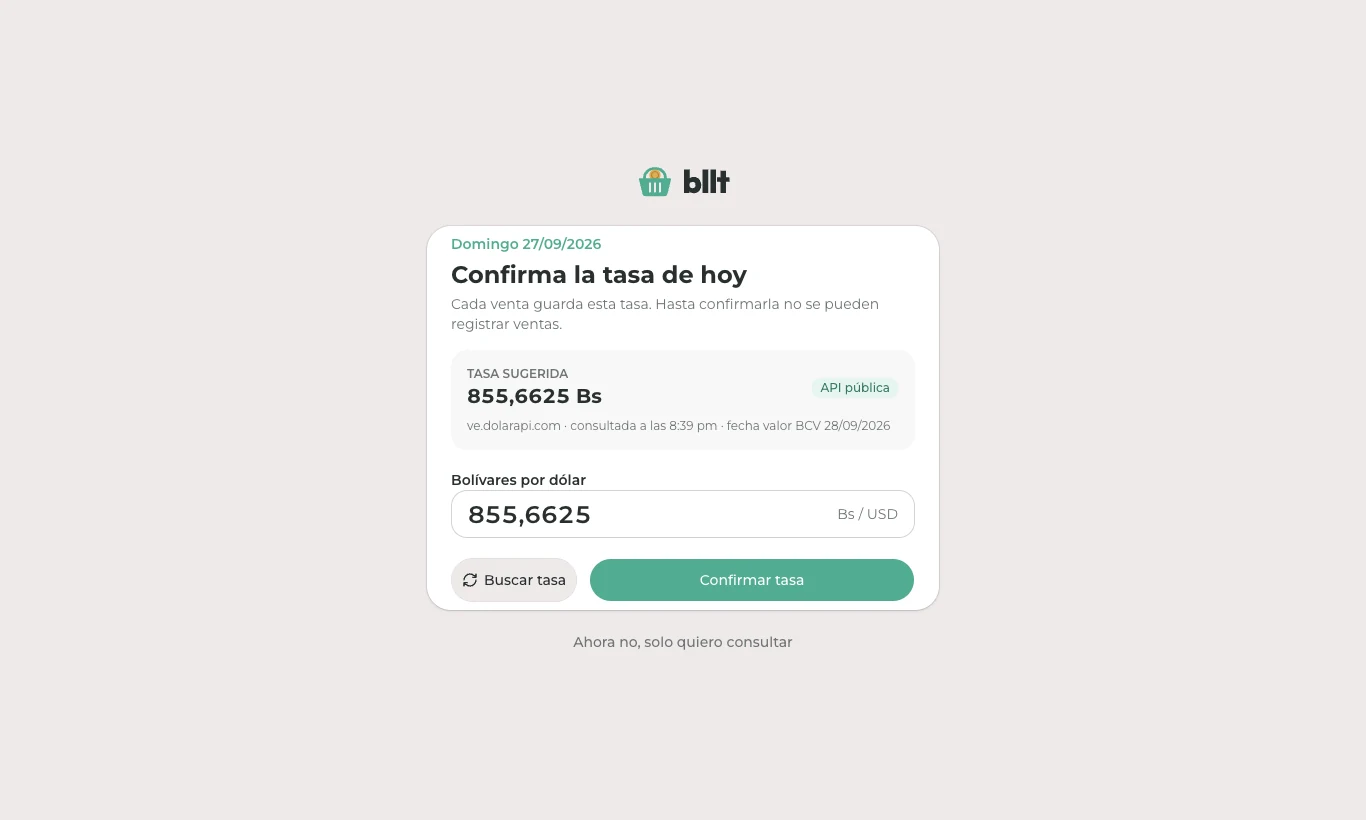
There is no official BCV (opens in a new tab) API, and the available sources scrape the bank's website under the hood. That is why the automatic rate is always a suggestion and manual entry is always available.
Fast sales, with or without a customer
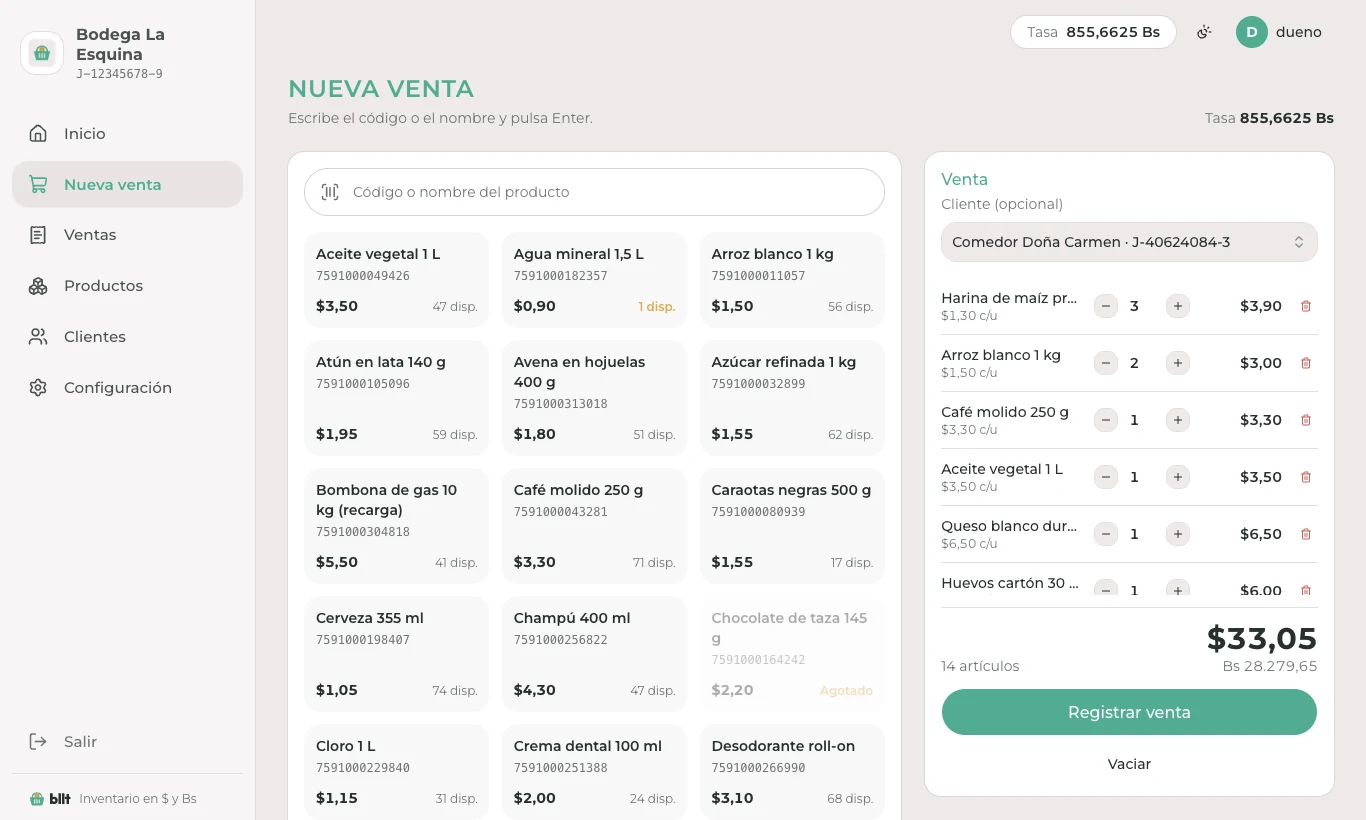
The sales screen is designed for the counter. You type the code or the name, press Enter and the product is added to the sale. The customer is optional. The total is shown in dollars and bolívares, and recording the sale updates the inventory.
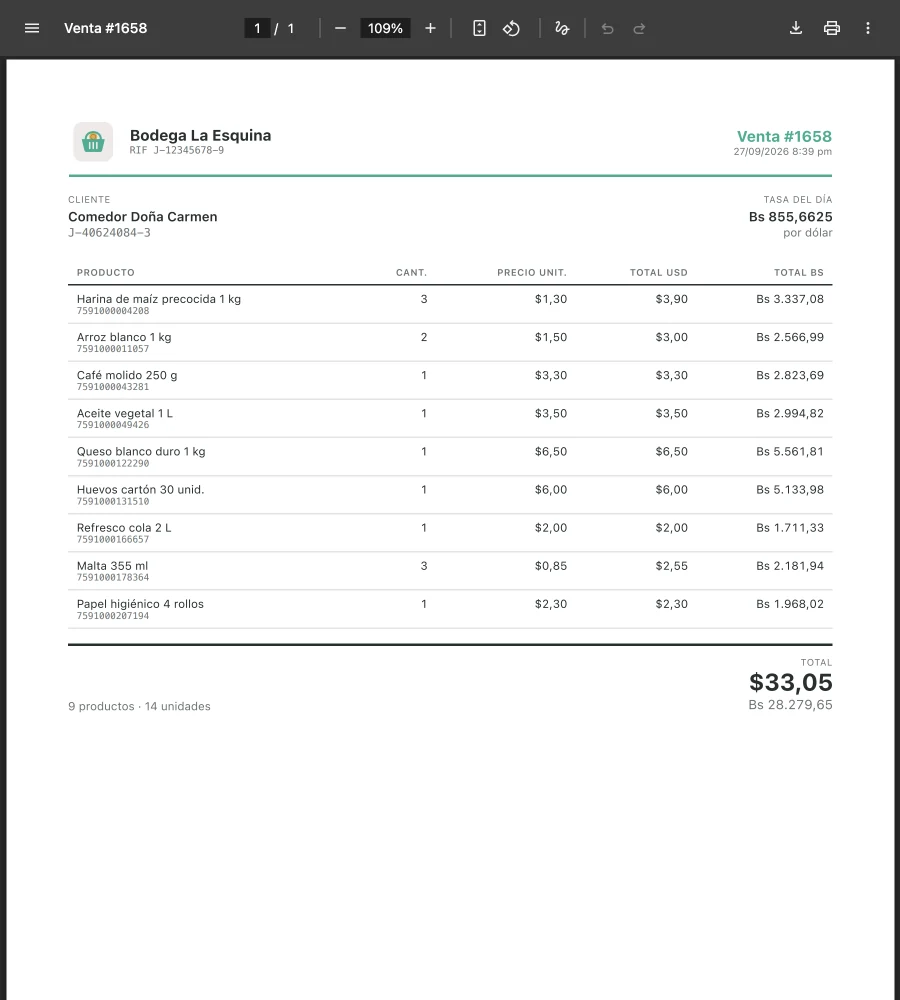
Each sale generates a letter-size PDF receipt with the business logo, name and tax ID (RIF), customer details, the rate of the day and every product with its amount in dollars and bolívares. It is an internal receipt, not a fiscal invoice.
Profits that do not change over time
This was one of the most important design rules. Each sale line stores the product's cost and price at that moment, and each sale stores its own rate. A line's profit is the quantity times the difference between price and cost, and its value in bolívares is calculated with that sale's rate, not today's. If a product's cost changes tomorrow or the rate goes up, yesterday's profits remain yesterday's profits.
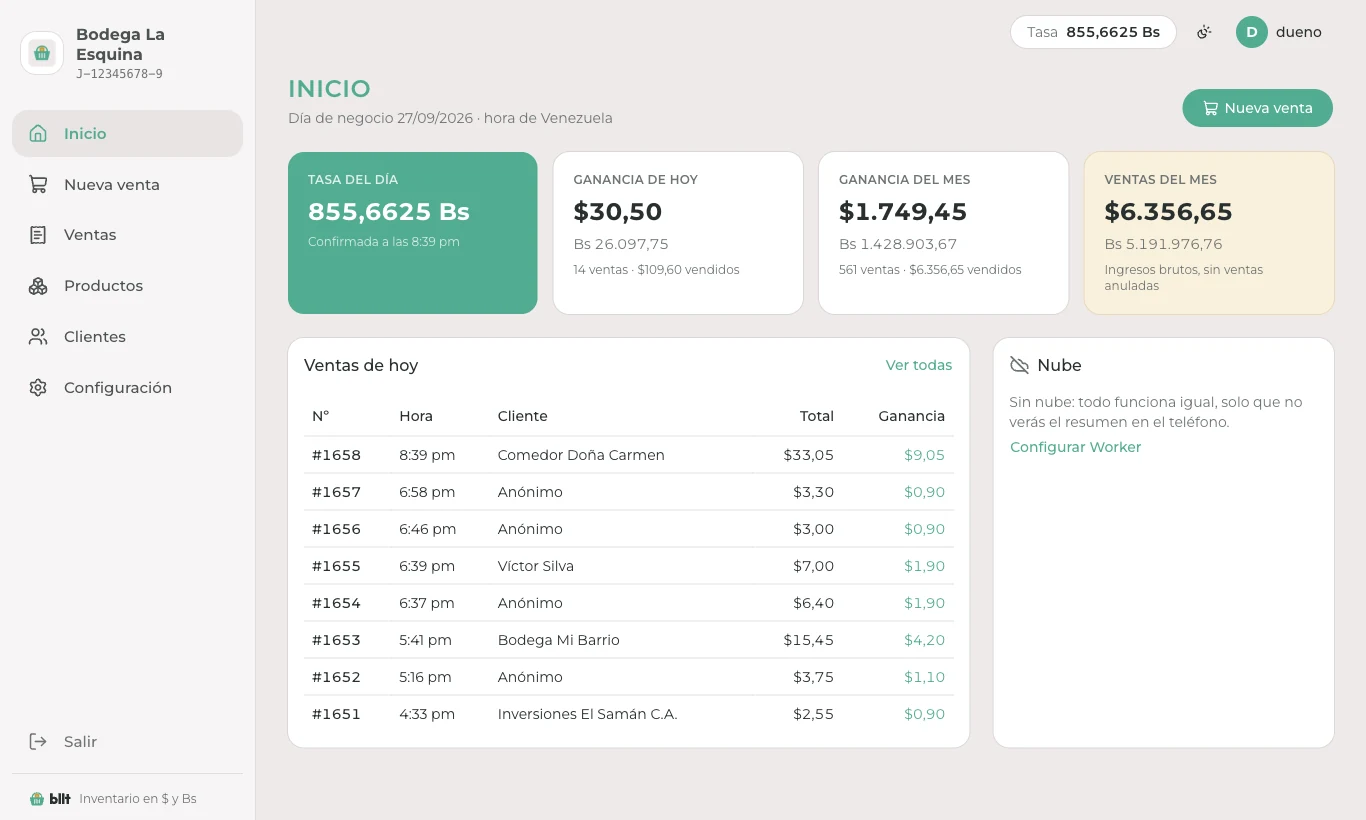
The home screen shows the rate of the day, today's and this month's profit, this month's sales and the list of today's sales.
Users, backups and export
- Users with roles: the first time the app opens, the owner is registered as administrator. Employees can sell, and the administrator also manages users, backups and exports.
- Automatic backups: one copy per day in
Documents/Bllt, without anyone having to remember. - Export of sales to Excel or CSV.
Optional, free cloud
Bllt works fully without the cloud. But there are two needs a local database cannot solve, which are checking how the day is going from a phone and using more than one computer in the same business. That is what the optional cloud is for. It runs on Cloudflare Workers (opens in a new tab) with D1 (opens in a new tab) within the free plan.
Each business deploys its own Worker, in its own Cloudflare account, using the "Deploy to Cloudflare" button in the repository. There is no central server, so the business's data stays in its own account and, within the free plan limits, it costs nothing.
The Worker has three jobs:
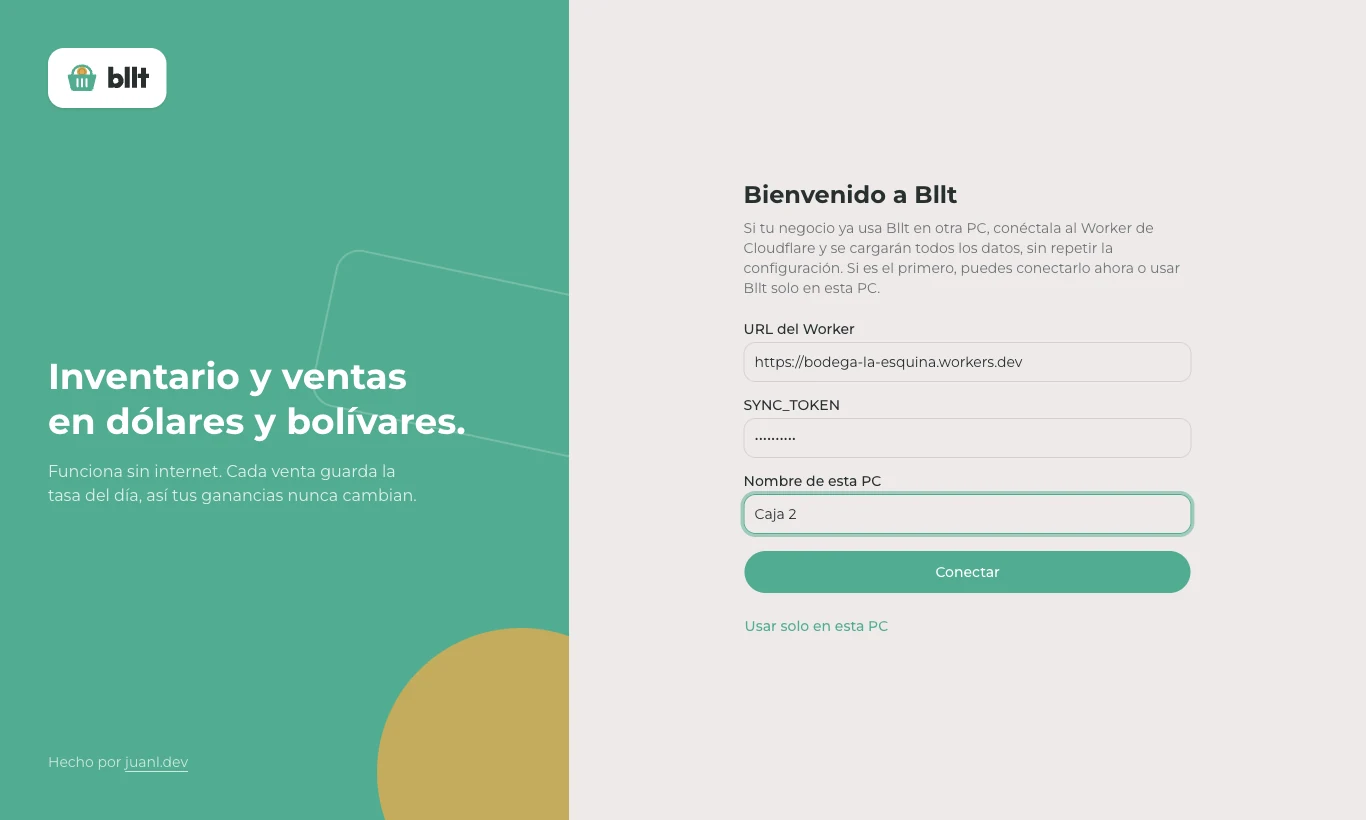
- Sync several PCs. Each PC stays independent and sells without internet. Its changes are saved to an outbox, in the same transaction as the write, and uploaded in batches when there is a connection; then it pulls what the other PCs did. A new PC joins from its first screen and loads all the data without repeating the setup.
- Serve the phone PWA (opens in a new tab). An installable web app, minimal on purpose, that only lets you sign in, see the day's summary and suggest the rate.
- Fetch the rate every 6 hours with a Cron Trigger (opens in a new tab), to suggest it to the PCs.
Some details of the sync:
- For products, customers, users and rates, the last change wins.
- Inventory does not travel as a number but as stock movements. That way, two PCs selling the same product at the same time do not overwrite each other.
- Each PC has its own token and its own invoice series (
A-000123,B-000045), so numbers never collide. - A voided sale never goes back to completed.
- D1 limits queries per invocation on the free plan, so the Worker accepts the part of the batch that fits and the PC resends the rest.
The deploy button uses a cloud branch that is only published from stable versions, just like the installer. That way no business runs code that has not gone through a release.
How it is built
It is a pnpm (opens in a new tab) monorepo, all in TypeScript (opens in a new tab):
apps/desktop: Electron (opens in a new tab), Svelte (opens in a new tab) and SQLite (opens in a new tab) (through better-sqlite3 (opens in a new tab)). It is the source of truth.apps/worker: Cloudflare Worker with Hono (opens in a new tab), D1 and a cron job.apps/web: the phone PWA in Svelte and Vite (opens in a new tab), served by the same Worker.apps/site: landing page and docs with static SvelteKit (opens in a new tab), at bllt.juanl.dev (opens in a new tab).packages/shared: Drizzle ORM (opens in a new tab) schema, Zod (opens in a new tab) validation, money and time handling, the sync contract and profit calculation.packages/ui: shadcn-svelte (opens in a new tab) components and brand pieces, with Tailwind CSS (opens in a new tab).
Using a single language across the project was a practical decision, because the desktop app and the cloud share the same schema, the same validation and the same profit calculation. The desktop app and the phone show exactly the same number because it comes from the same function.
A folder structure by domain
Every app is organized the same way, with the core/, libs/, utils/ and modules/<domain>/ folders. Inside each module there are three kinds of files, always with the same name and the same responsibility. This is the desktop app's main process:
apps/desktop/src/main/
├── core/            # bootstrap, db, ipc, session, config, errors
├── libs/
├── utils/
└── modules/
    ├── sales/
    │   ├── sale.repository.ts   # queries: the only place that touches Drizzle
    │   ├── sale.service.ts      # business rules
    │   ├── sale.ipc.ts          # adapter: Zod + session + role
    │   └── receipt.service.ts
    ├── products/
    ├── rates/
    ├── stock/
    ├── sync/
    └── ...
The Worker uses exactly the same shape. The only difference is the adapter, which instead of *.ipc.ts is *.routes.ts with Hono.
apps/worker/src/modules/sync/
├── sync.repository.ts
├── sync.service.ts
└── sync.routes.ts
The advantages I see in it:
- Everything for a domain lives together. If something breaks in sales, everything needed is in
modules/sales/, not spread across controllers, services and models folders. It is the same idea I explained in organizing by domain with vertical slices. - Layers with clear rules. Only repositories touch the database, adapters only validate and delegate, and a module uses another through its service, never through its repository. Business rules do not depend on whether the call came from the UI or from an HTTP request.
- The desktop app and the Worker read the same way. Moving from one to the other does not require switching mental models.
- It is predictable for an agent. A coding agent knows where each thing goes without guessing. The repository documents these rules in
AGENTS.md, and in practice that shows in changes that follow the structure on the first try.
With that separation, an adapter stays very thin. This is the full sales IPC file:
// apps/desktop/src/main/modules/sales/sale.ipc.ts
export function registerSaleIpc(): void {
  handle('sales:create', { input: saleInput }, (input, user) => saleService.create(user, input))
  handle('sales:list', { input: salesQuery }, (query) => saleService.list(query))
  handle('sales:page', { input: salesPageQuery }, (query) => saleService.page(query))
  handle('sales:get', { input: uuid }, (id) => saleService.get(id))
  handle('sales:void', { input: uuid }, (id, user) => saleService.void(user, id))
  handle('sales:previewPdf', { input: uuid }, (id) => receiptService.preview(id))
  registerReceiptPreview()
}
handle() validates the input with Zod, requires a session and role, and always returns a result instead of throwing errors at the UI. Electron's renderer never sees the database, only specific functions exposed from the preload script.
Recording a sale
The sales service brings the project's most important rules together in a single transaction. No rate means no sale, each line copies the current price and cost, the sale keeps its own rate, inventory moves as stock movements and the change goes into the sync outbox.
// apps/desktop/src/main/modules/sales/sale.service.ts (simplified)
create(user: SessionUser, input: SaleInput): SaleDto {
  // No confirmed rate for today, no sale
  const rate = rateService.requireToday()

  const id = transaction(() => {
    // ...load products and check stock
    items.push({
      id: newId(),
      saleId,
      productId,
      qty,
      priceCents: product.priceCents, // price at this moment
      costCents: product.costCents // cost at this moment
    })

    const series = deviceService.series() // one series per PC: A, B...
    const sale: SaleRow = {
      id: saleId,
      series,
      number: saleRepository.nextNumber(series),
      rate: rate.bsPerUsd, // the sale keeps its own rate
      status: SaleStatus.COMPLETED
      // ...
    }
    saleRepository.insert(sale, items)

    // Stock travels as movements, not as a number
    for (const item of items) {
      stockService.record({ productId: item.productId, delta: -item.qty, reason: StockReason.SALE })
    }

    snapshot(sale) // queues the sale in the sync outbox, same transaction
    return saleId
  })
  return this.get(id)
}
Money without floating point
Dollar amounts are stored in cents and the rate as an integer scaled to four decimals. Conversion to bolívares and the profit calculation live in @bllt/shared, and that is the only place they exist:
// packages/shared/src/money.ts
export const RATE_SCALE = 10_000 // 36.1234 Bs/USD -> 361234

export function usdCentsToBsCents(usdCents: number, rate: number): number {
  const product = usdCents * rate
  return Math.sign(product) * Math.round(Math.abs(product) / RATE_SCALE)
}

// packages/shared/src/profit.ts
for (const line of lines) {
  if (line.status !== SaleStatus.COMPLETED) continue
  const profit = line.qty * (line.priceCents - line.costCents)
  summary.profitUsdCents += profit
  summary.profitBsCents += usdCentsToBsCents(profit, line.rate) // the line's own sale rate
}
Since the desktop app and the Worker import the same function, there is no way for the phone summary and the PC summary to show different numbers.
Other decisions
- Always in Venezuela time. The "business day" is calculated in UTC-4, never with the PC's time zone.
- One schema for SQLite and D1. Migrations on both sides come from the same Drizzle schema.
- Nothing is deleted. Users are deactivated and sales are voided, returning the stock.
- Tests. Unit tests for money, time, profit and passwords; a Playwright (opens in a new tab) smoke test on the built app (first launch, rate, products, sale, dashboard and backup); and a two-PC test against a local Worker.
- Distribution. Creating a tag makes GitHub Actions (opens in a new tab) build the Windows installer with electron-builder (opens in a new tab) and publish it to Releases.
What it does not do
Bllt does not issue fiscal invoices or integrate with SENIAT (Venezuela's tax authority), does not handle payments or payment gateways, does not connect to fiscal printers or POS hardware, and is not multi-store. From the start the decision was to solve the essentials well instead of trying to cover everything.
Why use it
- It is free and open source, under the Apache 2.0 (opens in a new tab) license.
- It works without internet. If the connection drops, the business keeps selling.
- It is built for how people sell in Venezuela: prices in dollars, payment in bolívares and the rate of each day.
- The data belongs to the business: it lives on its PC and, if the cloud is enabled, in its own Cloudflare account.
- No subscriptions and no third-party servers.
- Easy to start: an installer for Windows 10 or later and step-by-step guides.
Current status
Bllt is in use at the business it was built for, on two computers. It runs on Windows 10 or later, and every version is published on GitHub Releases (opens in a new tab).
The code is on GitHub (opens in a new tab) and the docs, in Spanish, are at bllt.juanl.dev (opens in a new tab). The Bllt name and logo are not covered by the license, so if you want to publish a fork, check the TRADEMARKS.md file in the repository first.